Flying Airedale Learning
Some people think that anyone who can write - at all - should handwrite their math. I think this is because they do not know about available assistive technology, and also I think they don’t fully understand how much handwriting difficulties can impact math learning. I will attempt to make the case for math assistive technology - specifically typing or speech to text instead of handwriting - in two different ways. First, the plain language explanation. Math can be challenging at times, especially when we are learning something completely new to us. For some people, such as those with dysgraphia, handwriting can be frustrating, illegible, slow, physically difficult, and even mentally difficult. It is often wise to separate out difficult activities, so that you are not trying to do two difficult activities at the same time when you are learning something new.
Now for an expanded explanation that incorporates formal theories about learning. Cognitive load theory, proposed by John Sweller, explains that working memory is very limited, both in terms of how much information it can hold, and the time that it can hold it. Mathematics is a biologically secondary skill, meaning that it is not something that humans have evolved to pick up easily and independently, unlike biologically primary skills such as learning to walk or learning to speak your native language. In addition, mathematics has a large number of elements which interact with each other and so must be considered simultaneously, which means a heavy burden on working memory and so a high cognitive load.
In higher level mathematics in particular, there may be many steps necessary to solve a problem, and a large number of numbers and symbols and relationships to remember. It becomes essential to offload some information into written or visual form, both to communicate your thoughts to others, and to keep track of quantities and relationships accurately as the problem is worked. Memorizing math facts and practicing procedures until they’re moved to long term memory also lessen the load on working memory. If you are interested in learning more about this, here is a podcast in which mathematics professor Anna Stokke interviews John Sweller, the originator of cognitive load theory.
But wait, doesn’t typing your math also take up some working memory? I would expect so, yes, but I’d expect it to lessen with practice, and I’d expect it could be minimized by choosing user-friendly assistive technology. I would also expect that not having to decipher your own messy handwriting and overcoming your hesitancy to write at all would be benefits that would reduce frustration and would improve the accuracy of your solutions.
In my experience, frustration and emotional regulation challenges are also significant barriers to math. Do what you can to lower a student’s frustration level - it’s more important than some people realize. Handwriting is frustrating for some people, as is trying to do it all in your head and getting wrong answers as a result.
Another argument is found in Universal Design for Learning. UDL is an educational framework developed by the non-profit Center for Applied Special Technology (CAST) to make education more accessible and inclusive for all students. One principle of UDL is to design multiple means of engagement, including supporting choice and autonomy, and minimizing distraction. A second principle of UDL is to design multiple means of representation, including offering multiple ways to take in information, supporting decoding of text and mathematical symbols, use of multimedia, and offering opportunities to explore patterns. The third principle of UDL is to design multiple means of action and expression, including offering options to interact with materials by hand, voice, or keyboard.
Thank you to math teacher Leslie McFadden who first told me about Equatio and to Dawn Lundblad, a PT who used to maintain a youtube channel (Scribble Posse) about dysgraphia resources.
Desmos
Efofex, also known as FX Math Tools
Equatio
ModMath
KiwiWrite
MathKEYS
MathType
What are the nuts and bolts of how an upper-level math student could do all their math without handwriting? Last year I was fortunate to work with a high school student who needed a way to do high level math without handwriting. We devised a way to do our work together using Google docs, MATHKeys, Desmos graphing calculator, and a PDF copy of our textbook.
Here is a video demonstration.
The first thing I realized is that copying the problem out of a paper textbook was frustrating and error-prone for this student. What worked for us is that we would set up a google doc for them each day. It had screenshots of key formulas and theorems from the textbook at the top, followed by screenshots of the assigned problems. Early in the year I would set up this page for him, because it was helpful scaffolding as he was working on how to type his math and show his steps. Later in the school year we transitioned to him doing more of this setup for himself.
We considered using Equatio for typing equations, because it’s one of the few math tools that have speech to text, and because it was highly recommended by a math teacher friend of mine. However my student preferred to type instead of using speech to text, and we decided to try a free option before spending $179 on Equatio. We found MathKEYS, which is a free extension of the Chrome browser, written by a college student. It worked well for my student to type their equations using MathKEYS and paste them into the Google Doc where they were recording their work. This solution worked well for many kinds of math problems. When we had a need to graph equations we had to turn to strategies like talking about what the graph would look like, or typing the key characteristics (ex. “This equation would be a parabola that opens upward, with a vertex at [coordinate] and it would cross the x axis at [coordinate] and [coordinate].” We would often then graph the equation in Desmos to check our work. We also sometimes tried drawing on a whiteboard with a grid which was challenging for my student but workable sometimes in small quantities.
LaTeX and MathML are markup languages, or ways of separating content and formatting. If you aren’t familiar with the idea of a markup language, consider HTML (Hypertext Markup Language) which is used to format text on webpages. In HTML, <title>Very Good Webpage</title> tells your web browser that “Very Good Webpage” is the title of your web page and it should be formatted accordingly. In other words the content (words) are separate from the formatting. “Tags” or specific words surrounded by <brackets> give formatting information.
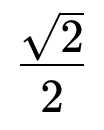
Similarly, LaTeX is a markup language that is often used in typesetting complicated math formulas for math and scientific journal articles, books, and presentations. In a classroom context LaTeX can be used to format handouts or tests. Here is a fraction as we might write it or find it printed somewhere:
This fraction can be written in LaTeX as: \frac{\sqrt2}{2}
It is possible to type math by typing LaTeX directly, but also, there are tools such as the MATHKeys Chrome browser extension or Equatio software that give you an easier graphical user interface and will generate LaTeX for you. LaTeX can also be read by some math assistive technologies.
MathML is another markup language - in fact it is an adopted standard by the World Wide Web Consortium (W3C) and is now supported by all major browsers and many software tools can take MathML as input or generate it as output. The fraction that we gave above would be represented in MathML like this:
<math xmlns="http://www.w3.org/1998/w3.org/1998/Math/MathML"> <mfrac> <msqrt> <mn>2</mn> </msqrt> <mn>2</mn> </mfrac> </math>
As you can see, LaTeX is more concise and mnemonic and easier for a human to write by hand. It is also better for typesetting. MathML is better for encoding math semantics and is more compatible with screen readers such as a low-vision person might need.
AsciiMath is a markup language designed to be very easy for humans to write, and there is open source JavaScript (MathJax) available to convert AsciiMath notation to MathML which is then renderable by the browser. Our expression from above would be written in AsciiMath like this: sqrt2/2
OpenMath is worth mentioning too, though it has nothing to do with how to visually display math, but is a way of precisely encoding math relationships in a way that is useful for passing information between software or databases.
More about LaTeX: https://www.latex-project.org/
More about MathML: https://www.w3.org/Math/
More about AsciiMath: https://asciimath.org/
More about OpenMath: https://openmath.org/